
Snap any Chinese text,
learn it instantly
AI-powered photo-based Chinese learning. No pinyin input, no manual dictionary lookups. Point at street signs, menus, or product labels — AI segments words and creates personal flashcards automatically.
"I've lived in Beijing for 2 years. Every day I see Chinese on street signs, menus, and product labels. I want to look them up, but I don't even know how to type pinyin..."
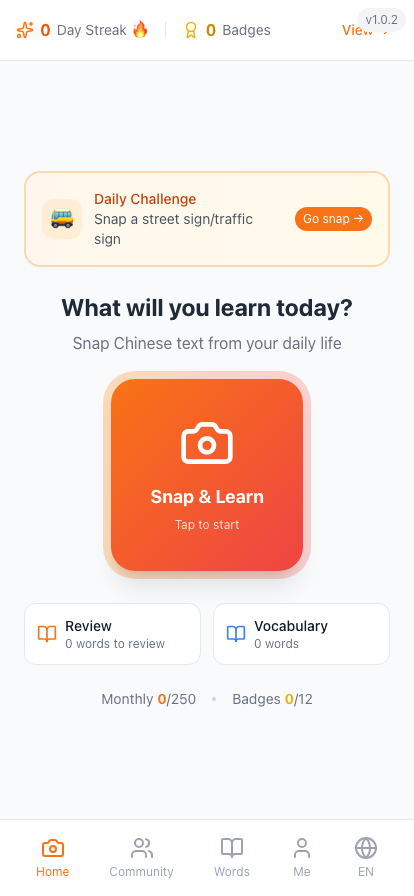
Walk the Four Seasons Street
A living Beijing hutong you can actually play — snap real signs, collect words, wander from spring blossoms to a snowy theatre night.
Enter the streetWhy is learning Chinese 10x harder?
Over 60 million people worldwide are learning Chinese, facing this struggle every day.
Can't Type It
Learners without a Chinese keyboard see characters but can't input them.
Must Segment
"Today I went to the supermarket" can't be understood character by character — it needs contextual segmentation.
One Character, Many Meanings
"自" ≠ yourself, "己" ≠ yourself, but "自己" = yourself.
You can spell English → You can't spell Chinese → You must snap a photo
Why existing tools fall short
More than a dictionary, a learning engine
Snap → OCR → AI segmentation → Flashcard → Save → Smart review
AI Camera Recognition
OCR + Kimi Vision dual engine. Point at street signs, menus, or product labels and recognize instantly, even in complex scenes.
AI Smart Segmentation
LLM-based contextual segmentation filters function words and extracts only meaningful vocabulary with 90%+ accuracy.
Scenario-Based Memory
Every word is tagged with a real-world scenario — restaurant, transportation, shopping — making memory deeper and more practical.
Community + Challenges
Discover interesting Chinese captured by learners worldwide, join weekly scenario challenges, and share new words as PostCards with friends.
Learn Chinese by snapping together
The hardest part of language learning isn't starting — it's staying consistent. ChineseSnap's community turns every photo into something seen, discussed, and remembered.
Discovery
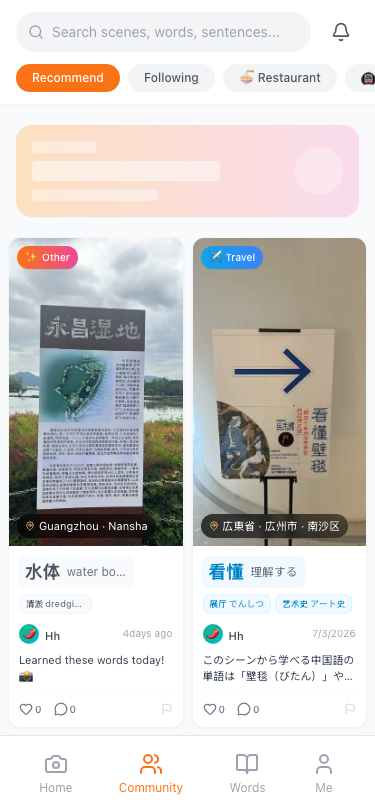
Discover real-world Chinese
Browse Chinese scenes shared by learners around the world: street signs, menus, billboards, product labels. Every snapshot is a learnable story.
Challenge
Weekly scenario challenges
Restaurant Week, Subway Stations, Supermarket Shopping... complete themed challenges with global learners and track your progress on the leaderboard.

PostCard
Share what you've learned
Turn captured Chinese into beautiful PostCards with segmentation, pinyin, and translation. Share with friends or social media — teaching others is the best way to learn.
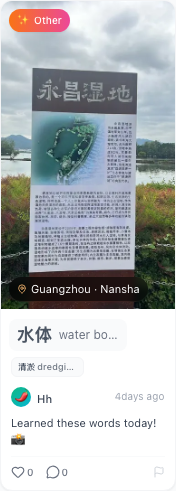
3 core learning scenarios
Turn every Chinese scene in daily life into a learning opportunity.
Restaurant Ordering
Snap the menu → recognize "Kung Pao Chicken 38 RMB" → segment → flashcard → save to "Restaurant" tag
Supermarket Shopping
Snap the product label → recognize "Pure Milk 250ml" → segment "pure milk" → pinyin + translation
Street Sign Reading
Snap the subway sign → recognize "Chaoyangmen Station" → segment "Chaoyangmen" / "station" → transportation vocabulary
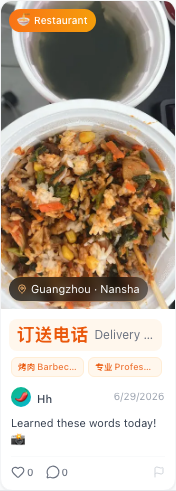
Restaurant · Menu recognition
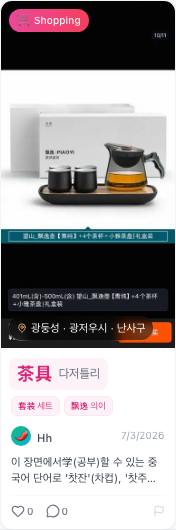
Supermarket · Product label recognition
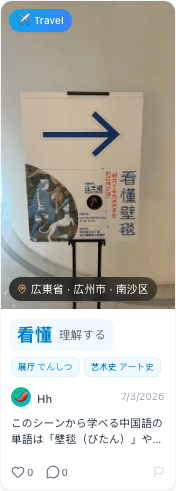
Street signs · Exhibition signs
The web is your second classroom
Install the ChineseSnap browser extension and snap Chinese text on any webpage — articles, menus, video subtitles and danmu. Everything you save flows into your in-app vocabulary, so your learning materials accumulate in one place, online and offline.
Snap on any webpage
Double-click any Chinese text for instant segmentation, pinyin and translation — no Chinese keyboard needed.
Subtitles & danmu
Capture Chinese from video subtitles and danmu while you watch.
Any area, any image
Draw a box over menus, posters or photos to OCR the Chinese inside.
Syncs with the app
Saved words flow into your app vocabulary for spaced-repetition review.
今天的天气非常好, 我们一起去餐厅吃饭吧。
ChineseSnap天气 tiān qì
weather
Offline with the app, online with the extension
Street signs, menus and product labels with the app; webpages, subtitles and danmu with the extension. One account, one vocabulary — every learning scenario covered.
Keep learning with chat, streaks & reminders
ChineseSnap is more than a camera dictionary. Practice with learners, build daily streaks, take learning notes, join weekly challenges, and get smart reminders that bring you back at the right moment.
Chat with learners
Message other Chinese learners, ask questions about words you snapped, and practice in a friendly community — without leaving the app.
Streaks & learning notes
Track your daily learning streak and jot down notes for every word. Small wins compound into lasting fluency.
Weekly challenges
Restaurant Week, Metro Stations, Supermarket Run… complete themed challenges, earn achievements, and climb the leaderboard.
Smart reminders
AI-powered nudges remind you to review captured words at the perfect time, so you never forget what you learned.
Four simple steps to start
No complicated setup. As easy as taking a photo. The whole process takes just 5 seconds.
Snap
Open the camera and point at the Chinese you want to learn
AI Parse
OCR recognition + LLM smart segmentation
Flashcard
Pinyin, translation, examples, and cultural context
Review
Smart review driven by spaced repetition
Why use AI segmentation?
Without AI, segmentation accuracy drops from 90% to 30%.
Traditional Segmentation (Rule Dictionary)
Input: "Today I went to the supermarket and bought apples and milk"
["Today", "I", "go", "supermarket", "buy", "le", "apple", "and", "milk"]
Includes meaningless function words like "le" and "and"
ChineseSnap AI Segmentation (Kimi LLM)
Input: "Today I went to the supermarket and bought apples and milk"
["Today", "supermarket", "apple", "milk"]
Understands context, filters function words, extracts truly meaningful vocabulary
Real user feedback
Authentic voices from ChineseSnap users.
I can finally understand menu item names. Before, I could only point at pictures to order.
US User
Living in Beijing for 2 years
The segmentation is amazing. "苹果" isn't "苹" + "果" — this app truly understands Chinese.
Korean User
Studying in Shanghai